Oniri vs Awoken vs Elsewhere vs Lucidity: Which Dream App in 2026?
Whether you want to record your dreams for creativity, interpret your dreams to better understand yourself, or control your dreams with lucid dreaming, you might have come across one of those dream apps.
Those four apps are popular options on iOS and Android when it come to working with your dreams. Some have been around for more than a decade. But how to choose between them?
We tested them for you. We analyzed hundreds of reviews, installed and paid them, and summarize our findings below. All the apps were given the same care during testing, and every claim below is something you can check yourself.
TL;DR#
- Awoken is the oldest app but is not maintained anymore. It's Android-only, free but with ads, and the cloud backup function doesn't work, so you lose your data if you lose your device.
- Elsewhere is made for dream journaling and dream interpretation. It's good for the community but doesn't have any lucid dreaming features.
- Oniri and Lucidity have a mix of dream journaling, lucid dreaming, and dream interpretation features. Oniri is slightly more expensive but has more features like widgets, soundscapes, and night cues.
Oniri vs Awoken vs Elsewhere vs Lucidity, side by side#
(If you're on a small screen, scroll the table horizontally to see all apps.)
| Feature |  Oniri Oniri |  Awoken Awoken |  Elsewhere Elsewhere |  Lucidity Lucidity |
|---|---|---|---|---|
| Availability | ||||
| iPhone | ✓ | ✕ | ✓ | ✓ |
| Android | ✓ | Stalled | ✓ | ✓ |
| Price | $59.99/yr | Free + IAP | $49.99/yr | $49.99/yr |
| Ads | None | Yes | None | None |
| Journaling | ||||
| Recurring people | ✓ | ✕ | ✓ | ✓ |
| Track emotions and mood | ✓ | ✕ | ✕ | ✓ |
| Track places and symbols | ✓ | ✕ | ✓ | ✓ |
| Scan journal | ✕ | ✕ | ✓ | ✕ |
| Cloud backup | ✓ | Not working | ✓ | ✓ |
| Export your dreams | ✓ | ✕ | ✓ | ✓ |
| Interpretation | ||||
| AI interpretation | ✓ | ✕ | ✓ | ✓ |
| Emotions graph | ✓ | ✕ | ✕ | ✓ |
| Nightmare analysis | ✓ | ✕ | ✕ | ✕ |
| Lucid dreaming | ||||
| Reality-check reminders | ✓ | ✓ | ✕ | ✓ |
| Guided MILD, WILD, SSILD | ✓ | ✕ | ✕ | ? |
| Night cues | ✓ | ✓ | ✕ | ✕ |
| Dream goals | ✓ | ✕ | ✕ | ✓ |
| Soundscapes | ✓ | ✕ | ✕ | ✕ |
| Binaural beats | ✓ | ✕ | ✕ | ✕ |
| Other features | ||||
| Home-screen widgets | ✓ | ✕ | ✕ | ✕ |
| Apple Health integration | ✓ | ✕ | ✕ | ✕ |
| Share dreams publicly | ✕ | ✕ | ✓ | ✕ |
How we tested#
We collected data and reviews on both the App Store and the Google Play Store, and everywhere the apps were mentioned. We analyzed hundreds of reviews to see what people like, dislike, and complain about. The four apps compared here are the most popular choices, and a selection of their reviews is quoted below, with the good and the bad summed up for each app.
We installed, purchased, and tested all four, on an iPhone and an Android phone where both versions exist. We tried and used all features, from the essentials to each app's unusual trick.
For each app we outline what users say, what worked in our tests and what didn't, all features, price, pros and cons, and our verdict.
The four dream apps in detail#
Here are the four apps, ranked by how complete their set of features is and how enjoyable they are to use.
1. Oniri (iOS & Android)#
Features#
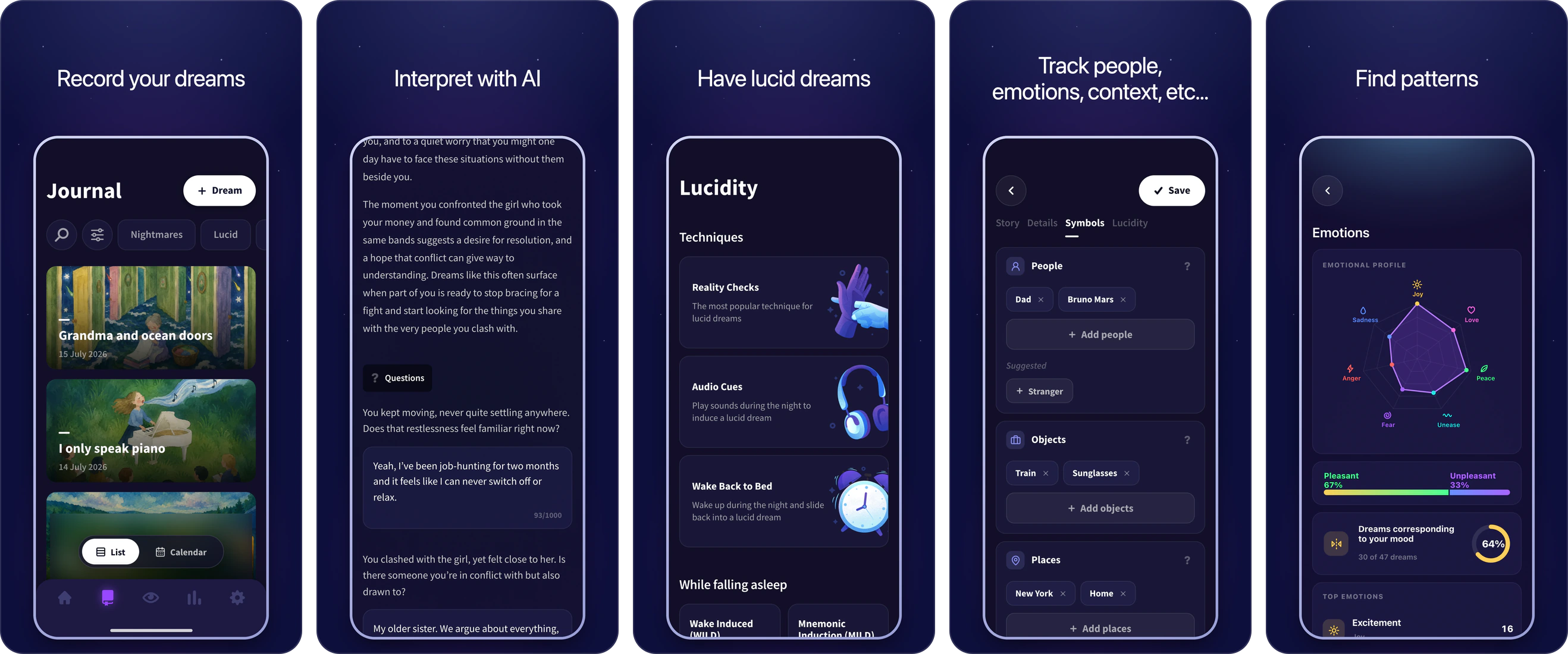
- Tag emotions, people, places, symbols and dream signs on every entry
- Statistics, correlations and nightmare analysis to find patterns
- AI interpretation that asks you follow-up questions first
- Reality-check reminders, home-screen widgets and guided MILD, WBTB, WILD and SSILD
- Soundscapes, binaural beats and night cues
- Voice transcription, a sketch pad, and export to PDF, TXT or CSV
Pros#
- Dream journaling is completely free
- The only app here covering journaling, interpretation and lucid dreaming
- Home-screen widgets for dream capture and reality checks
- Lots of statistics and modules to analyze your dreams
Cons#
- No dream wall to share your dreams with others
- Only one lens for dream interpretation
- Android was lagging behind, but the 2026 rebuild resolved it
Our verdict#
Oniri is the only app of the four that takes journaling, interpretation and lucid dreaming all seriously, and the only one where the three work from the same data. A dream is structured data rather than a paragraph: symbols, the people in it, the places, the emotions, a sketch or a voice note. All that data feeds the statistics, so you can see what emotions appear with what person, which symbols often appear together, or who comes back frequently in your nightmares. And you can just tap to add people, places and emotions, which makes it easy to use in the morning, when the dream is slipping away.
The free tier is unusually wide, and reviewers notice it more than any feature: unlimited entries, all the tagging, reality checks, widgets, export, no ads. Premium buys the AI interpretation, voice notes, more statistics, the guided lucid dreaming techniques and the audio, so the three jobs live in one app.
The Android app lagged behind for a long time, and many reviewers complained about missing features and bugs. But it was rebuilt from scratch in 2026, and recent reviews are much better. Users say the Android version is now on par with iOS.
What people say about Oniri#
4.6on the App Store · 3,738 ratings
- Deep journaling: symbols, people, places, emotions, stats
- The AI asks follow-up questions about your life
- Voice notes, transcription and a sketch pad
- Reality-check reminders and home-screen widgets
- Guided techniques, soundtracks and binaural audio
- Export and import as PDF, TXT or CSV
- A generous free tier, with no ads
- Interpretation, voice notes and statistics are Premium
- The Android version was lagging behind for a long time
- Some people had issues logging into their account
There is so many things you can do without a subscription, and theres no ads at all! You can add elements to your dream without having to write them down, which is extremely helpful when you are tired, or your dream is slipping away.
For the last 5 years I've been using this app often to record my dreams. It helps me remember my dreams way better am i can see patterns over time that i would have never known.
I'm just using the free version at the moment which is rather good! i had an issue and reached out to them and they got back to me really quickly too.
The app crashed, and when I tapped on it again, it had logged me out. Upon logging in, I saw all my entries were gone. In 2024, how ridiculous is it to not have the capacity or capability within an app to have entries saved for use upon log out/log in.
Hi! Your data is safe, we can help you get your account back. Please write us at support@oniri.io and we'll do our best to help! Sweet dreams
Forced to update and all my dreams logged over the years are gone. Now it's only a paid version. All my stuff is gone. This is the worst
Hi! The app is still free, you can close the premium page with the cross button. Please contact us at support@oniri.io and we'll help you get your data back!
This app started out really good. but now doesn't seem to function very well. I add in a dream entry and then when I go back to edit it, it overwrites my previous entry.
Sorry about that! We completely remade the app from scratch, fixing all bugs, making the experience much better, and adding a lot of features. Could you please check it out and let us know what you think? If you experience any issues, please don't hesitate to reach out at support@oniri.io. Sweet dreams!
Oniri FAQ#
What is Oniri best at?
Covering everything in one app. It's the only one of these four that does deep journaling, AI interpretation and a full lucid dreaming toolkit, on both iPhone and Android, and the three share the same data, so your journal makes the interpretation and the statistics better over time.
How much does Oniri cost?
$12.99 a month or $59.99 a year, after a 7-day trial. Journaling, tagging, reality-check reminders, widgets and export are free with no ads. Premium adds the AI interpretation, voice notes, more statistics, the guided techniques and the audio. If you only want to journal, you can use it for years without paying.
Can you move a journal from another app into Oniri?
Yes. Oniri imports TXT and CSV and exports PDF, TXT and CSV, all on the free tier, so you can bring your dreams from another app and take them with you if you ever leave. Of the four here, Awoken is the one you'll struggle to leave, because it has no export at all.
2. Elsewhere (iOS & Android)#
Features#
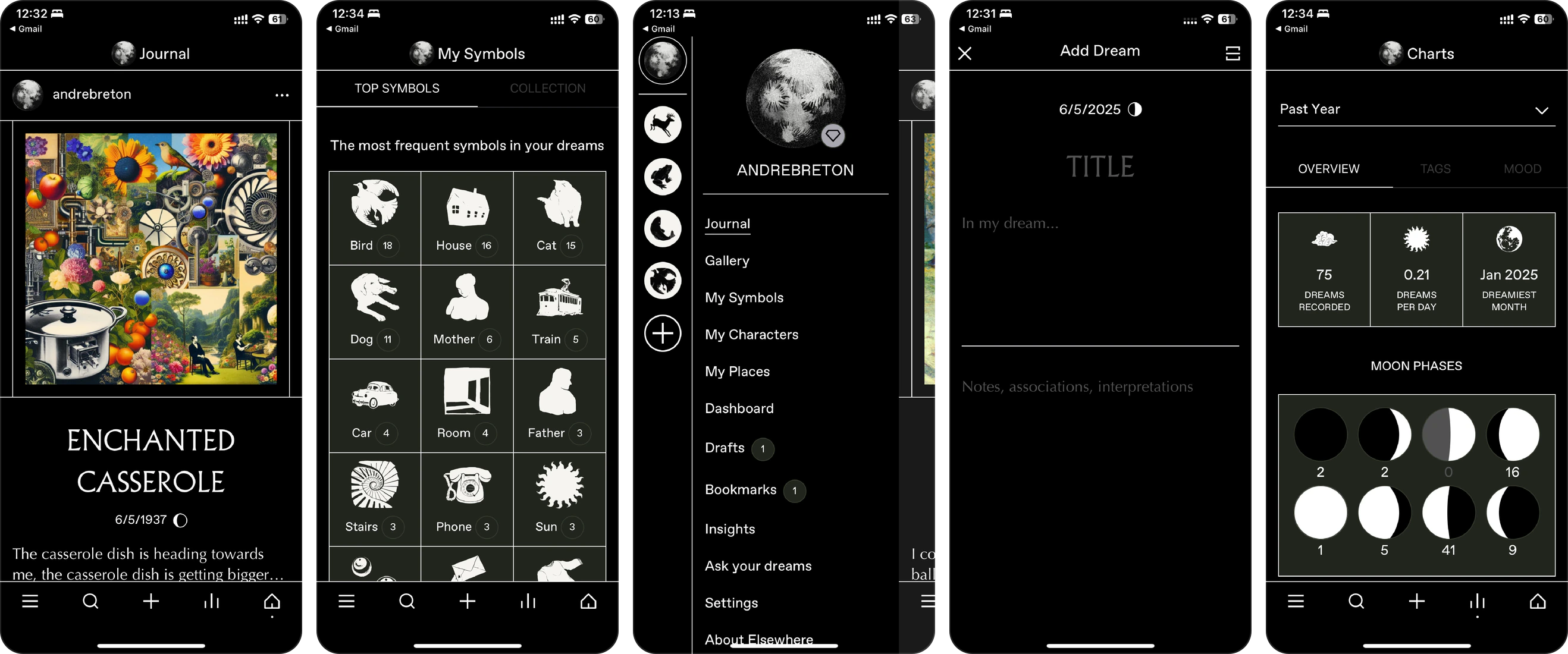
- Automatic tagging of characters, settings and symbols
- Jungian, Freudian and spiritual interpretation lenses on the same dream
- Generated dream art on every entry
- Scan a handwritten journal page straight into an entry
- Share dreams publicly, with friends or in a dream group
- A world map of your dreams, and other people's
- iPhone, Android and a web app
Pros#
- Share your dreams with the community
- Choose the lens for dream interpretation
- Scan a paper journal straight into the app
- A clean monochrome design, with art on every entry
Cons#
- No lucid dreaming features at all
- Metered AI, even on the paid plan, and no free trial
- No voice recording or transcription
- Sometimes hard to know what is public and what is not
Our verdict#
Elsewhere is the youngest app of the four, released in 2023, with a monochrome, editorial design and generated art on every entry. Where Oniri lets you tag your dream in detail, Elsewhere keeps the process very simple: enter your dream, and it gets tagged automatically, with an image and an interpretation. On the paid tier you can read the same dream through a Jungian, Freudian or spiritual lens. Its symbol content is credited to David Fontana and the dream researcher Kelly Bulkeley.
Elsewhere is really built around the community. You can share your dreams publicly, with friends, or in a dream group, and see all public dreams on a world map. If you want to share your dreams with others, that's what it's built for. It doesn't have any lucid dreaming features, though, so look at the other apps if that's your goal.
The pricing is fiddly. A real free tier, then two annual plans at $49.99 and $99.99 that differ by how much AI you are allowed: the cheaper one comes with roughly 35 image generations and 50 interpretations, and credit packs top you up beyond that. Ask for a reading every morning and fifty lasts you about seven weeks, so count before you subscribe.
What people say about Elsewhere#
4.9on the App Store · 106 ratings
- Symbol content credited to David Fontana and Kelly Bulkeley
- Insights on the symbols that keep coming back
- Striking monochrome, editorial design
- Automatic tagging of characters, settings and symbols
- AI dream art that keeps people journaling
- Interpretations and images are metered, even on the $49.99 plan
- No free trial of Premium
- A big social layer, and it takes a while to learn what is private
- Bug reports cluster on Android: sign-up, getting data out
Probably the most beautiful app I've ever used. Please add an app lock!
Works seamlessly from a handwritten scan of my journal. The interpretations take into account any personal notes, so is insightful not generic. It is really well priced with options to use for free or to buy credits, if you prefer to not have a subscription.
You will be mind blown at how insane of a mind reader this app is. It’s honestly like a tiny therapist. So neat and mind blowing!!!
I was very excited about this app but it usues a faulty AI algorithm. The art and even the tags didn't match my content. I had better luck with Chat GPT.
Hi Alison, we're really sorry you had a bad experience with the app. We spent a lot of time developing our tagging system and crafting our AI analyses and image prompts so that they would be helpful when working with your dreams. We've made a lot of improvements since v3 and would love to see if the app is better for you now…
it kept saying internal server error, and that there was an issue deleting my account. really irritating, considering you just told me my data is "in my hands" and then I can't even do anything with it because of a problem on your end.
Apologies that you had this experience - we found out there was a bug in the account deletion process of which we weren't aware. We've now fixed that bug and you should be able to delete your account without any issue or if you'd like us to do it for you, please email team@elsewhere.to.
anytime I tried to Export my Data the App froze. When I tried closing it out and reopening the App, it would often crash.
…Thank you for checking the app out and for your honest feedback. We’ve now added a free trial so you can try the Premium version. You can use that to create your own art prompts.
Elsewhere FAQ#
Is Elsewhere good for lucid dreaming?
No, and it doesn't claim to be. There are no reality checks, no alarms and no induction techniques. Elsewhere is about journaling, interpretation and sharing your dreams. Pick Oniri or Lucidity if lucidity is the goal.
How much does Elsewhere cost?
There is a free tier, then annual plans at $49.99 and $99.99 that differ by how much AI you get. The $49.99 plan comes with roughly 35 image generations and 50 interpretations, with credit packs on top. There is no free trial of the paid tier.
Can you export your dreams from Elsewhere?
Yes, to CSV, and it's free, like in Oniri and Lucidity. Of the four apps here, Awoken is the only one with no export at all.
Can you lock Elsewhere with Face ID or a PIN?
Yes, we found this option in our test, but it's a bit buried in submenus and hard to find. It looks like it was added recently, because some reviews complain that this is not possible.
Which platforms does Elsewhere run on?
iPhone, Android and a web app, which no other app in this comparison offers. Android is the shakier half: 4.2 on Play against 4.93 on the App Store, with the low reviews clustering on sign-up failures and getting data out, though both averages rest on a few dozen ratings.
3. Lucidity (iOS & Android)#
Features#
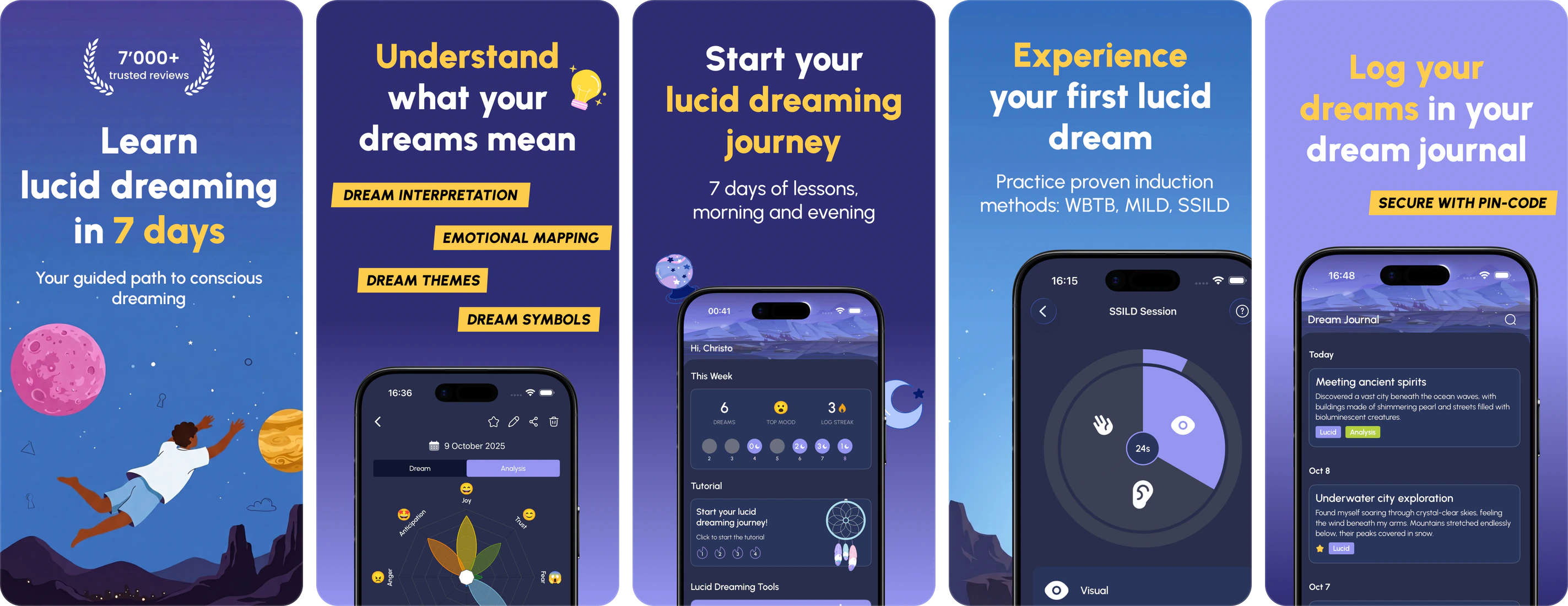
- Seven-day course, a lesson each morning and evening
- Guided practice timers for SSILD, WBTB, MILD and WILD
- Emotions, people, places, objects and themes per entry, with an emotion graph
- Reality-check reminders you can retime and reword
- AI analysis and auto-tagging on Pro
- Unlimited free journaling
Pros#
- A course that teaches the techniques in order
- Journaling is free and unlimited
- Almost as much tagging depth as Oniri, plus an emotion graph
Cons#
- The AI is the weakest part, and the only thing Pro buys
- The induction timers unlock several days into the course
- No audio cueing at night, and no AI image generation
Our verdict#
Lucidity teaches. Its seven-day course gives you a morning lesson and an evening one, and the practice screens have a timed dial that runs the visual, tactile and auditory phases and counts you through them, with equivalents for WBTB, MILD and WILD. They unlock several days into the course, so a week of using the app its way is the price of trying the thing you downloaded it for. Once you're asleep, though, it has nothing to offer beyond an alarm you set yourself.
The journal comes closest to Oniri's tagging depth. It tracks emotions, people, places, objects and themes, draws an emotion graph across your entries, and lets you mark the odd specifics like sleep paralysis, your mood on waking or the colour of a dream. Journaling is free, and what costs money is the AI layer, at $49.99 a year. That's the weak part, with short, fairly general readings and no image generation. The developer works alone but answers most reviews within hours, and a July 2026 auto-save bug that lost half-awake notes was patched in a few days.
Overall, it's a consistent app with a good balance of journaling and lucid dreaming, and one of the oldest on Android. But its AI features are limited next to what Oniri or Elsewhere give you for a similar price.
What people say about Lucidity#
4.7on the Google Play · 7,163 ratings
- Emotions, people, places, objects and themes, plus an emotion graph
- Marks the odd stuff too: sleep paralysis, mood, dream colour
- 7-day course with morning and evening lessons
- Guided practice timers for SSILD, WBTB, MILD and WILD
- Free journaling is unlimited
- The developer answers most reviews within hours
- AI analysis, pattern spotting and auto-tagging are Pro-only
- The interpretation stays short and fairly general
- A July 2026 auto-save bug lost half-awake notes (now fixed)
- The rating prompt fires minutes after install
Unlike many other apps I tried this one doesn't feel bloated with features and is very responsive. The free version is useable if you just want journalling, the paid version adds AI analysis, auto tagging and a lucid dream assistant
this is the only thing I've used since hearing about lucid dreaming, now I lucid dream, and it's only been 10 days
I love this app. It gives me some motivation to wake up early and pursue something every morning. I also really like writing down my dreams and looking at my past dreams. Even without premium this app is enjoyable.
youre barely awake to write down highlights, you close your phone to continue sleeping and wake up to find that theres no auto save and your notes are gone
Hi Klaus, we have fixed this bug, please try using the app again. Thanks for reporting the bug and happy dreaming ✨
I'm not going to pay for an app that wants me to rate it 5 stars before it's even done anything
Hi Dax, the app provides an introduction and analysis demo before asking for a rating. Up to you! Please try the app more and if you enjoy, update your rating 🤗 happy dreaming
Had this app for 10 years and loved it because it was simple, free, and looked amazing, now you have to click through a billion prompts, login, and do a 7-day free trial just write down dreams Did the owners get too greedy and forget a simple note app can replace their app
Hi Jordan, the app has improved a lot over the past 3 years with many additional functions. You can still use all the original features for free. Lucidity Pro is for advanced users and unlimited dream analysis. You can always write down unlimited dreams for free. Thanks for your review and happy dreaming ✨
Lucidity FAQ#
Is Lucidity on iPhone?
Yes, since 2024, published under Christopher Benz. It started as an Android app, and the iOS version is new enough to have almost no ratings yet. Be careful searching: an unrelated iOS app by another developer is also called Lucidity.
What does Lucidity Pro unlock?
AI dream analysis, auto-tagging and the lucid dreaming assistant, at $12.99 a month or $49.99 a year with a 7-day trial. Journaling, emotion tracking and the graphs stay free and unlimited, which is more generous than the complaints suggest.
Does Lucidity play audio cues during the night?
No, and it's the biggest gap in an otherwise complete trainer. Lucidity covers the daytime habit and the technique lessons well, but once you're asleep it has nothing beyond an alarm you set. For overnight cueing you're looking at Oniri's audio tracks, or Awoken, which does it for free.
Who makes Lucidity?
One developer, publishing as b3nz on Google Play and as Christopher Benz on the App Store. Replies to reviews usually come within hours, and the July 2026 auto-save bug that was eating half-awake notes was patched in about three days. Journaling and export are both free, so take a copy every few months and you're covered whatever happens to the app.
4. Awoken (Android)#
Features#
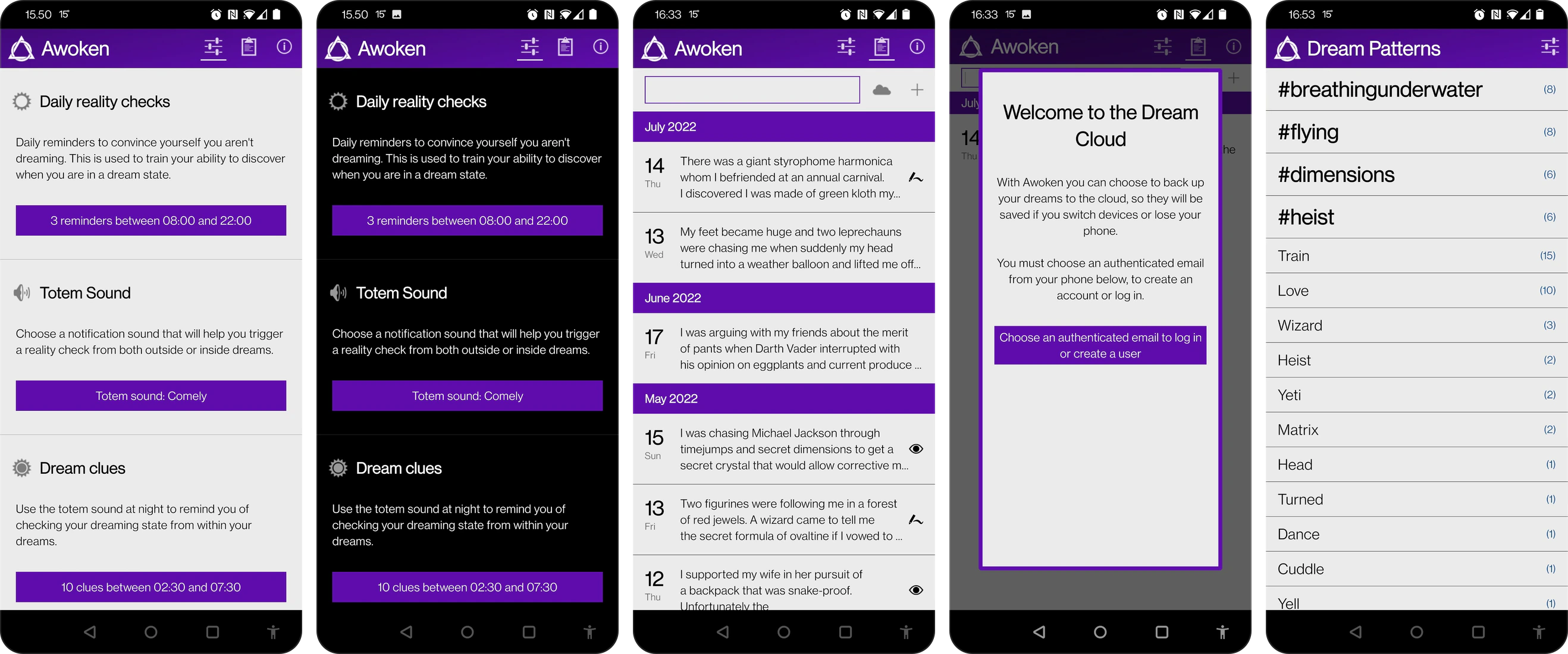
- Reality-check reminders with a totem sound you learn to react to
- Dream Clues: real audio cues played into your sleep
- PIN-protected journal that never leaves the phone
- Sketch a dream, or record one by voice on premium
- Free, ad supported, with a small one-time unlock
Pros#
- Real overnight audio cueing
- Free, ad supported, with a small one-time unlock
- Reality-check reminders with a totem sound
Cons#
- No export, and the cloud backup did not work for us
- Ads run inside the writing screen
- The journal is a date, a text field and a lucid checkbox
- Android only, and nothing shipped since July 2024
Our verdict#
Awoken is the oldest app of the four, and the one every early lucid dreaming article recommended. It's free, it's small, and it does one thing extremely well. Reminders fire through the day with a totem sound you learn to associate with checking reality, and overnight Dream Clues play audio into your sleep, which is real cueing rather than a marketing word. Free means ad supported, though, and the banners run inside the entry screen while you write, which for a dream journal is the worst place an ad could be.
Now the catch, and it's a big one. Its Dream Cloud backup did not work in our testing, matching a year of reviews all quoting the same error, and there is no export, so whatever you write stays on that phone. Reviewers who switched devices describe losing years of dreams. The app hasn't been updated since July 2024, the interface feels outdated, and the journal is minimal (a date, a text field and a lucid checkbox), so there isn't much to find patterns in. Overall, a valid free option for reality checks, but you get what you pay for, and we wouldn't trust it with your dreams.
What people say about Awoken#
4.4on the Google Play · 21,565 ratings
- Simple, out-of-the-way design that just works
- Reality-check reminders with a totem sound
- Overnight Dream Clues: real audio cueing at night
- Sketch a dream, or record one by voice on premium
- PIN-protected journal, and nothing leaves your phone
- Cloud sync did not work in our test, so the journal is local
- Banner ads run inside the composer while you write
- The journal is one text field and a lucid checkbox
- The interface has not been redrawn in a decade
- The premium purchase cannot be restored on a new install
- No export, so no way off a dying phone
Easy to use, simple, convenient and out of the way. Been using it for 6 years approximately.
Seriously a great app for Lucid dreaming training! It's simple, and easy to use, and has all the basic tools needed for self teaching. No need for floofy bells and whistles, just simple useful tools to get you where you want to be in a very short time.
Gave it 5 stars in 2016 Giving it 5 stars 2025
I used to use this all the time, 5+ years at this point. The cloud server is dead, I haven't been able to recover anything for months. Thank god I still have my old phone to recover my logs or 5 years would have been totally lost
It pains me to do this, but I have to give 1-star. Notifications don't work. No vibration, no tone. they only activate when I open the app, defeating the purpose of a reality check notification. I checked my settings to ensure there are no restrictions on the notifications and that the app isn't being forced to sleep. Nothing :/
Purchased the app long ago, but I'm still getting ads. Remove ads button errors out and says I already own this item.
Awoken FAQ#
Is Awoken still worth using in 2026?
As a free reality-check trainer with overnight audio cues, yes, and it has done that job well for over a decade. As a place to keep your dreams, no: its cloud backup did not work in our testing, there is no export, and the app has not been updated since July 2024.
Is Awoken on iPhone?
No. Awoken is Android only and always has been. Any comparison that lists it as an iPhone option is wrong.
Is Awoken free?
Yes, funded by ads, and one of those ads sits at the bottom of the screen where you write your dream. One reviewer says the distraction made them lose a dream twice. A small one-time purchase removes the ads, though several people report it can't be restored on a new install.
Where does Awoken keep your dreams?
On the phone, and nowhere else. That's a genuine privacy position (no account, nothing sent anywhere, a PIN on the journal) and it's also the problem, because the Dream Cloud backup that was supposed to be the escape hatch has been returning a server error for over a year, and there's no export. Whatever you write is tied to that handset.
Where these four dream apps actually differ#
On paper the four apps overlap a lot. Here is where they really differ.
Price#
Awoken is free with ads and a small one-time unlock, and that remains its strongest argument. The other three let you journal for free forever and charge a yearly subscription for the extras. In Elsewhere and Lucidity that's mostly the AI, and Elsewhere's is metered, so heavy users run out and end up buying credit packs. Oniri's Premium covers the AI along with the guided lucid dreaming techniques and the audio. If all you want is a journal, Oniri, Elsewhere and Lucidity cost you nothing.
Keeping your dreams#
This is the only dimension where one of them fails outright. Oniri, Elsewhere and Lucidity sync to an account for free and let you export. Awoken's backup did not work for us and it has no export, which makes it the wrong place for anything you want to keep. Use it for the reality-check training, and keep the dreams themselves in an app with an export button.
Lucid dreaming#
Oniri has the widest toolkit: reality-check reminders and widgets, guided MILD, WBTB, WILD and SSILD, and soundscapes, binaural beats and night cues that play while you sleep. Lucidity has a seven-day course, with timers that count you through each technique, but nothing at night. Awoken does reality checks and night cues and nothing else, and Elsewhere does none of it.
No app makes anyone lucid on its own. The largest study of reality testing found it did little by itself; what worked was reality testing combined with MILD and a brief wake-back-to-bed.[1] The apps that help are the ones that turn that combination into a habit. And around 55% of people have already had at least one lucid dream,[2] so most beginners are closer than they think.
Meaning#
Oniri and Elsewhere take two different approaches. Oniri asks you questions about your life before it interprets, and builds the reading from your answers and from the patterns in your past dreams. Elsewhere lets you switch between a Jungian, Freudian or spiritual lens on the same dream, with symbol content credited to the authors it names. Lucidity's interpretation is the thinnest of the three. Awoken has no interpretation at all, which some of its reviewers consider a feature.
Who is actually behind them#
Nobody compares this, and it tells you more than the feature lists do. Lucidity is one developer, Christopher Benz, while Elsewhere and Oniri are small teams, and all three answer their reviews, often within hours. Awoken's developer stopped shipping in July 2024, and everything awkward about using it now follows from that one fact.
So check the last update date before you trust any dream app with years of entries, then read the most recent one-star reviews rather than the most helpful ones. A stalled app shows up there first, usually as several people quoting the same error message.
Platform#
Awoken is Android only. Elsewhere adds a web app to iPhone and Android, which no one else here has. Lucidity started on Android, and its iOS version is still new. Oniri runs on both, and since the 2026 rebuild the Android app is the same as the iPhone one.
What none of these dream apps do well#
Each app has its gaps, but a few things are missing from all four.
Nightmares are the first one. Oniri's nightmare analysis shows who and what keeps coming back in your bad dreams, and Elsewhere lets you flag one, but none of the four walks you through the rehearsal techniques clinicians use to change a recurring nightmare. Given how many people arrive at a dream journal because something keeps waking them at 3am, that is a strange blind spot.
Sleep timing is the second gap. Wake-back-to-bed is the most useful thing in the lucid dreaming literature, and none of these four can tell you when your own REM periods fall. Two will help you set an alarm. None will pick the hour, and the apps that try need a watch or a $200 mask.
Handing your dreams to another person is unsolved too. If you see a therapist and want them to read the last two months, your options are a PDF export or reading aloud from your phone. Nothing here was designed for it, and dreams are one of the few things people genuinely do bring to a professional.
And none of the three that interpret will tell you whose server your dream goes to. It leaves your phone the moment you ask, and not one listing names the provider, ours included. Awoken is the only one of the four where nothing you write goes anywhere, and a few of its reviewers consider that the whole point.
Which dream app should you use?#
If you want one app for the whole practice, with the deepest journal, interpretation and lucid dreaming tools, that's Oniri. If you'd rather share your dreams with a community and compare Jungian and Freudian readings, and don't need lucid dreaming, choose Elsewhere. If you want a course that teaches lucid dreaming step by step, go for Lucidity. And if you want to spend nothing and train reality checks, Awoken can do it, but keep your actual dreams in an app with an export button.
If you're still not sure, the longer breakdowns are in our roundup of dream journaling apps, interpretation apps and lucid dreaming apps, each of which tests a wider field than these four. And whichever you pick, export your dreams once a year.
All the apps were given the same care during testing, including Oniri, which we develop ourselves. We applied the same testing methods, and analyzed the reviews from users the same way as other apps. All links are unaffiliated. No app paid to be featured on this list. Prices, ratings and versions were checked in August 2026.
Veelgestelde vragen
Which of these four dream apps is the best?
Oniri, for most people: it's the only one of the four that covers dream journaling, AI interpretation and lucid dreaming in one app, with a free journal and no ads. Elsewhere is built for sharing your dreams with a community, and Lucidity for following a seven-day lucid dreaming course. Awoken still trains reality checks for free, but its backup doesn't work and it has no export, so it can't be trusted with your dreams.
Which one is free?
All four have something usable for free. Awoken is free outright, with ads and a small one-time unlock. Oniri, Elsewhere and Lucidity all allow unlimited free journaling and charge for the AI layer, at $49.99 to $59.99 a year.
Which of these keeps your dreams safest?
Oniri, Elsewhere and Lucidity all sync to an account for free and let you export your data. Awoken is the outlier: its cloud backup did not work in our testing, and it has no export at all, so a journal there lives on that one phone and cannot leave it.
Bronnen en referenties
Dit artikel is gebaseerd op gepubliceerd onderzoek, peer-reviewde studies en betrouwbare boeken. Bekijk de bronnen hieronder als je verder wilt lezen.
[1]Reality testing and the mnemonic induction of lucid dreams: findings from the national Australian lucid dream induction study
Aspy, D. J., Delfabbro, P., Proeve, M., & Mohr, P. · 2017
Dreaming, 27(3)
[2]Lucid dreaming incidence: a quality effects meta-analysis of 50 years of research
Saunders, D. T., et al. · 2016
Consciousness and Cognition, 43

Geschreven door
Founder of Oniri
Jean-Baptiste founded Oniri and researches dreams, lucid dreams, creativity, and AI. He collaborates with the Sleep and Cognition Neuroimaging Laboratory in Geneva and is invested in different studies about lucid dreams and the intersection of dreams and AI, including a paper in the Journal of Sleep Research on cathartic dreams.
Deel dit artikel